How do you modernize legacy courses into custom eLearning?
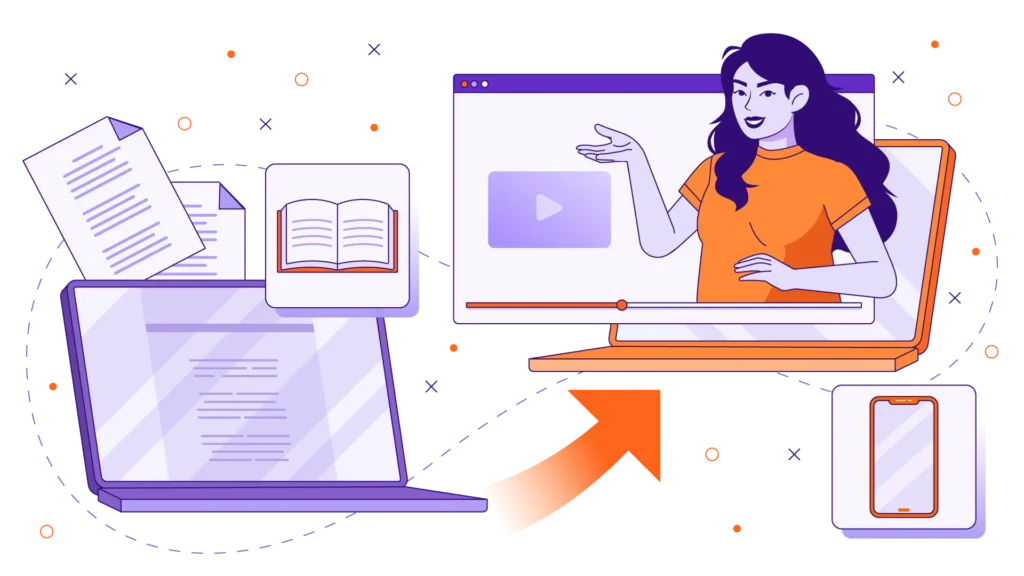
To modernize legacy courses into custom eLearning, organizations must audit their outdated materials—such as long PDFs, hour-long webinar recordings, or click-next-slide decks—and deconstruct them into focused, interactive modules. This involves applying adult learning principles, rewriting scripts for modern attention spans, and using custom eLearning content development to replace walls of text with high-fidelity video, animations, and scenario-based assessments. By investing in professional custom eLearning course development, L&D teams can transform obsolete training into dynamic, mobile-friendly assets that increase knowledge retention and drive measurable performance.
We all have them sitting in our Learning Management System: the dreaded legacy courses. They are the 90-minute recorded webinars from four years ago, the endless compliance PDFs, and the static PowerPoint presentations that force learners to just click “next” until their eyes glaze over. While these assets might check a mandatory compliance box, they are actively disengaging your workforce and failing to drive real behavioral change.
The modern professional is accustomed to consumer-grade, mobile-first digital experiences in their daily lives. If your corporate training looks like a relic from 2012, your employees will tune it out. The solution is not to simply chop up those long courses into smaller, context-less pieces; true modernization requires native custom eLearning design. In this guide, we will break down exactly how to transition your obsolete training materials into dynamic, results-driven learning ecosystems. To see how we completely overhaul legacy content into modern learning pathways, explore our custom eLearning services.
The Cost of Ignoring Legacy Training Materials
Holding onto outdated online course development strategies is more expensive than you might think. Beyond the obvious issue of poor visual aesthetics, legacy courses carry high hidden costs:
- Cognitive Overload: Traditional legacy courses bombard employees with broad topics and multiple objectives in a single session, overwhelming the brain’s processing capacity.
- Low Retention: Because legacy courses are often structured as one-time “data dumps,” learners fall victim to the forgetting curve, losing the majority of the information within days.
- Wasted Payroll: Forcing an employee to sit through a 60-minute module just to find one 3-minute answer they need for their job is a massive drain on productivity.
- Mobile Incompatibility: Older courses (especially those built on outdated software architectures) often break on mobile devices, making learning in the flow of work impossible for distributed or frontline teams.
4 Steps for Custom eLearning Course Development
Transforming your legacy training isn’t just a graphic design update; it is an instructional engineering process. Here is the step-by-step framework for successful custom eLearning course development.
Step 1: Content Audit and Deconstruction
Start by pulling your legacy assets and identifying the core behavioral objectives. Strip away the fluff, the deep historical context, and the “nice-to-know” data. If you have an hour-long webinar, deconstruct it by identifying the top three to five specific questions or tasks that learners actually need to perform. Remember, the golden rule of modern design is “One Video, One Objective.”
Step 2: Redefine Objectives and Apply Instructional Design
Once the content is chunked out, apply modern learning frameworks. Instead of writing text intended for reading, script your modules for the ear. Use the Hook-Context-Action framework to ensure your content respects the learner’s time: explain why the training matters immediately, provide brief context, and then jump straight into the step-by-step action.
Step 3: Visual Transformation and Custom eLearning Content Development
A wall of text will not change behavior. This is where custom eLearning content development truly shines. Match your newly defined micro-objectives with the optimal visual format:
- Interactive Screencasts: Replace old software manuals with high-fidelity, clickable software simulations.
- Animated Scenarios: Replace bulleted lists of HR policies with character-driven stories where learners can safely see the consequences of their choices.
- Live-Action Demonstrations: Use human elements to teach safety or peer-to-peer soft skills, building instant authenticity.
You can review a diverse array of these visual delivery styles in our video production portfolio.
Step 4: Authoring, Interactivity, and LMS Deployment
The final step of online course development is packaging the media into an interactive authoring tool (like Articulate Storyline or Rise 360). This allows you to build in scenario-based assessments, knowledge checks, and interactive branching. Finally, export the asset as a SCORM or xAPI package to ensure it tracks perfectly on your LMS and provides you with deep analytical insights into user engagement.
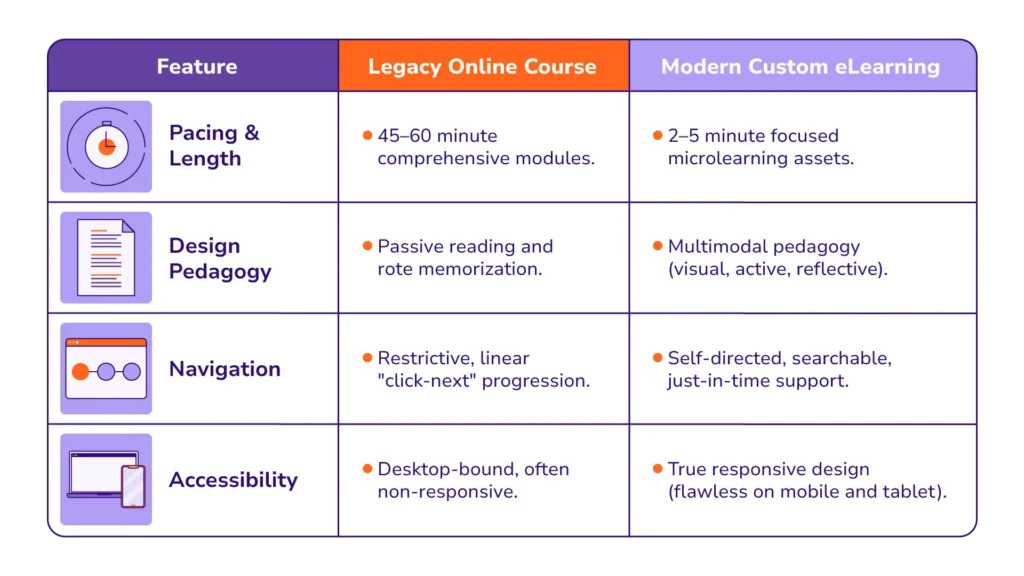
Traditional vs. Modern Online Course Development
When comparing your old catalog to a modernized custom eLearning library, the differences in user experience are night and day:
Partnering with a Custom eLearning Expert
Modernizing a legacy training ecosystem can quickly overwhelm an in-house L&D team that is already balancing day-to-day administrative tasks. Taking a 60-minute webinar, slicing it into ten 6-minute clips, and calling it “modern” fails because the context is lost; true modernization must be designed natively for the new format.
If you are ready to unlock the trapped value inside your existing manuals, old courses, and long-form webinars, you do not have to map out the journey alone. At Ninja Tropic, we act as a strategic execution engine, specializing in custom eLearning content development. We transform dry, exhaustive documentation into vibrant, behavior-driving learning assets. Check out our association case studies to see how we’ve helped complex organizations scale their impact, and head over to our Contact Page today to schedule a strategy session.
Frequently Asked Questions (FAQs)
What is custom eLearning?
Custom eLearning is the process of designing and developing digital training content specifically tailored to an organization’s unique brand, operational realities, and business KPIs. Unlike off-the-shelf courses, custom solutions use your specific terminology and address the exact scenarios your employees face daily.
Why shouldn’t I just chop up my old legacy webinars into smaller videos?
A common mistake in online course development is simply slicing up a long recording into shorter clips. This usually fails because the overarching context is lost. Effective modernization requires that each short module be natively scripted and designed to stand alone, complete with its own hook, instruction, and call to action.
How long does custom eLearning course development take?
The timeline for custom elearning course development depends heavily on the complexity of the legacy content and the desired visual fidelity (e.g., standard text vs. high-end animation). However, most organizations can expect a standard microlearning module to move from content audit through scripting, storyboarding, and final LMS deployment in about 4 to 8 weeks.