
So how do you go about choosing between LMS video hosting and a dedicated training video platform? That’s the question L&D and IT will need to answer when they’re making their decision. The key considerations will be cost, tracking, load performance, and integration effort. The simplest option is to host the videos directly in the LMS. That keeps everything in one place but invariably results in poor load times, data transfer issues and very basic completion tracking. The alternative is to use a dedicated eLearning video delivery platform which provides dynamic bitrate streaming for a perfect viewing experience, much more robust viewer analytics (drop-off rates, heatmaps, etc.) and a very good content management system. The flip side of that is that you’re now paying for a second piece of software and you have the integration (SCORM, xAPI or LTI) to consider.
For a lot of organizations, video hosting is an invisible infrastructure decision until something breaks. You’ve just launched a much anticipated HD training series to a dispersed workforce and all of a sudden the IT helpdesk is absolutely flooded with tickets. The frontline staff are complaining about constant buffering, the remote workers are saying their videos simply won’t load on their mobiles and the L&D team are realizing they’ve hit the platform’s storage limit.
Treating video files in the same way as you would PDFs or slide decks is a complete and utter mistake. High fidelity video requires its own delivery methodology. In this guide we’ll compare native LMS video hosting against a dedicated video platform on the four metrics that really matter to IT and L&D. If you want to see how we build high performing media that works on any platform then take a look at our bespoke eLearning services.
The Four Pillars of eLearning Video Delivery
Before you go down any hosting architecture route, think about the impact on the learner experience and the technical overhead that it will impose on the organisation.

1. Load Performance and Streaming Quality
- Native LMS hosting: most LMSs are built to host static content (SCORM packages, documents etc). When they host video, they typically do so via progressive download. So if you’ve got an employee with a fairly poor internet connection trying to watch a 1080p video the LMS is going to attempt to push that large file down a small pipe and you’re going to get absolutely horrendous buffering and the video is going to fail to play.
- Dedicated video platforms (Vimeo OTT, Kaltura, Wistia, etc) use Dynamic Bitrate Streaming (ABS). The platform is able to detect the user’s internet speed in real time and will dynamically change the video quality (e.g. from 1080p to 480p) to ensure that playback continues.
- Native LMS hosting: the LMS will provide you with binary tracking (the video was either completed or it wasn’t). It won’t tell you whether the learner muted the video, skipped to the end or re-watched a section.
- Dedicated video platforms (i.e. a training video platform) will give you incredibly granular second by second analytics. You can see heat maps which will tell you precisely where people are dropping off, what bits they’re rewatching and their overall engagement score. Absolutely brilliant for ongoing instructional design.
2. Cost and Bandwidth Limits
- Native LMS hosting: uploading your video directly to your LMS will normally incur no additional software subscription. The downside of course is that the video files are huge. If your LMS charges you for storage or bandwidth then hosting hundreds of HD videos natively will result in massive overage fees.
- Dedicated video platforms: you do do need to pay a separate subscription fee, but they’re built for scale and have massive storage capacities and very predictable bandwidth pricing. They’re the more cost-effective option if you’ve got a large video library.
3. Integration Effort
- Native LMS hosting: zero integration effort. Just upload the MP4 into the course builder and the LMS takes care of the access permissions and completion gating. Video platforms: you’ll need to integrate. You’ll need to embed the video player into the LMS via iFrames or integrate the platforms via LTI (Learning Tools Interoperability) or xAPI for the LMS to properly recognise that viewing the video on the external platform has resulted in a ‘course complete’.
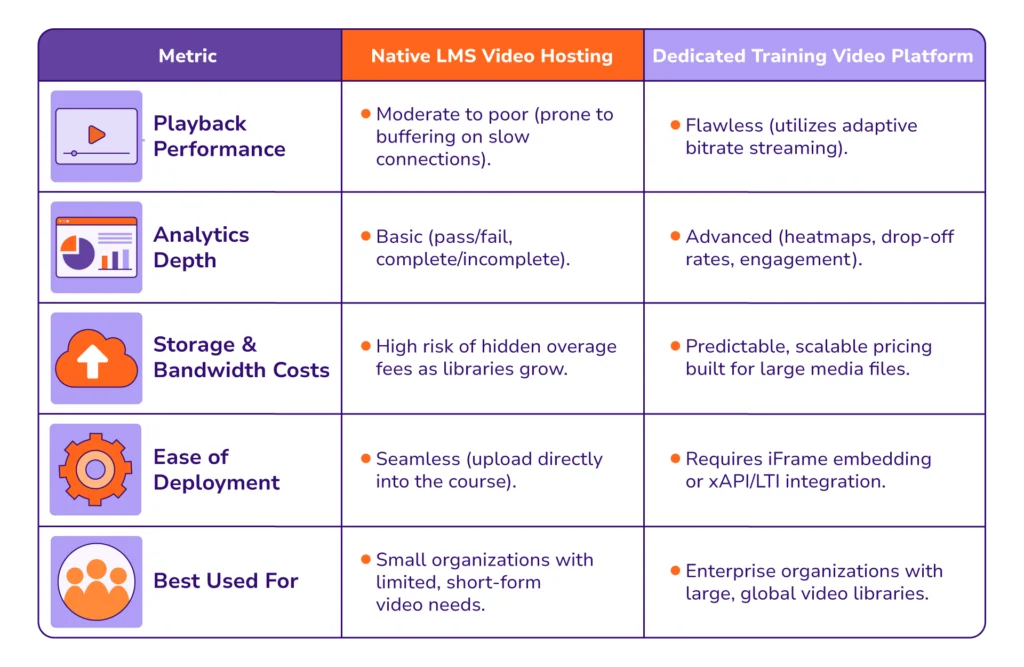
LMS vs. Dedicated Platform Comparison Matrix
Use this breakdown to work out which eLearning video delivery method is right for your infrastructure.
Making the Right Infrastructure Choice
If your training program is based around a handful of short, low resolution compliance clips then native LMS video hosting will likely be more than adequate if video is the key element of your L&D. If however video is the central component of your L&D then attempting to host hours of HD, interactive content natively is going to destroy the learner experience and eventually blow your storage budget.
By using a dedicated training video platform and integrating it properly with your LMS, you can guarantee that every employee gets a seamless, consumer-grade experience wherever they are and on whatever device they’re using.
If you’re looking at upgrading your learning infrastructure and need high-fidelity, optimized media to go with it, we’re more than happy to share our association case studies and demonstrate how we’ve gone about optimizing media for very complex global deployments. Get in touch via our Contact Page if you’d like to talk through your next big training roll out.
Frequently Asked Questions (FAQs)
What is the main drawback of LMS video hosting?
The biggest drawback with native LMS video hosting is playback performance. As most LMSs don’t employ dynamic bitrate streaming, students on the slower connections and on mobile devices are going to suffer from horrendous buffering. That has a huge impact on engagement and completion rates.
How does a dedicated training video platform improve tracking?
A dedicated training video platform provides second by second analytics. It’s not just a ‘course completed’ type of metric. You get heat maps that show precisely when a learner has skipped ahead, paused or dropped off. That enables the L&D team to identify exactly where the content is failing.
Will using an external platform disrupt the delivery of my eLearning videos within my LMS?
No, as long as it’s properly integrated. You can integrate external video platforms into an LMS via LTI, xAPI or simple iframe embeds. The video will play within the LMS, and the external server will do all the streaming and analytics.