
How can an AI companion improve patient education design? By using a structured, role-based AI companion, instructional designers can rapidly transform dense clinical guidelines into empathetic, health-literate microlearning outlines and video scripts. Because patients experiencing health challenges are often overwhelmed and suffer from cognitive overload, education must be concise and easily digestible. Using specialized AI prompts and frameworks allows learning experience designers to bypass the “blank page” phase, drastically speeding up the creation of patient-friendly storyboards and scripts without sacrificing clinical accuracy or emotional intelligence.
If you are a Learning Experience (LX) Designer or Instructional Designer in healthcare, you know how daunting patient education can be. You are constantly tasked with taking a 40-page, jargon-heavy clinical care manual and turning it into a 2-minute video that a stressed, anxious patient can actually understand and act upon.
Generative AI (like ChatGPT, Claude, or Google Gemini) is an incredible tool for accelerating this process. However, if you have ever tried asking AI to “write a training video about knee surgery,” you know the output is usually robotic, overwhelmingly dense, and completely devoid of bedside manner.
To get publication-ready, patient-centered content, you need to prompt the AI like a master instructional designer. That is why we have created a free, downloadable AI Companion for Patient Education. In this guide, we will break down why generic prompting fails in healthcare, what is inside this free Markdown (.md) file, and how it will transform your daily workflow. To see how we bring empathetic, AI-assisted scripts to life, explore our video production portfolio.
Why Generic AI Fails in Patient Education
When patients are diagnosed with a new condition or are preparing for a procedure, their cognitive load is already maxed out by stress and fear. They do not need a medical textbook; they need clarity, reassurance, and actionable steps.
Generic AI prompts fail because they lack instructional guardrails. They default to writing like a medical encyclopedia. To act as a true companion in generating effective patient education, your AI workflows must dictate:
- Reading Level: Forcing the AI to target a 6th-to-8th-grade reading level to ensure broad health literacy.
- Tone: Instructing the AI to use an empathetic, comforting, and authoritative voice.
- Microlearning Structure: Limiting the output to a single learning objective (e.g., “How to change your bandage” rather than “Everything about wound care”).
What is Inside the Free AI Companion?
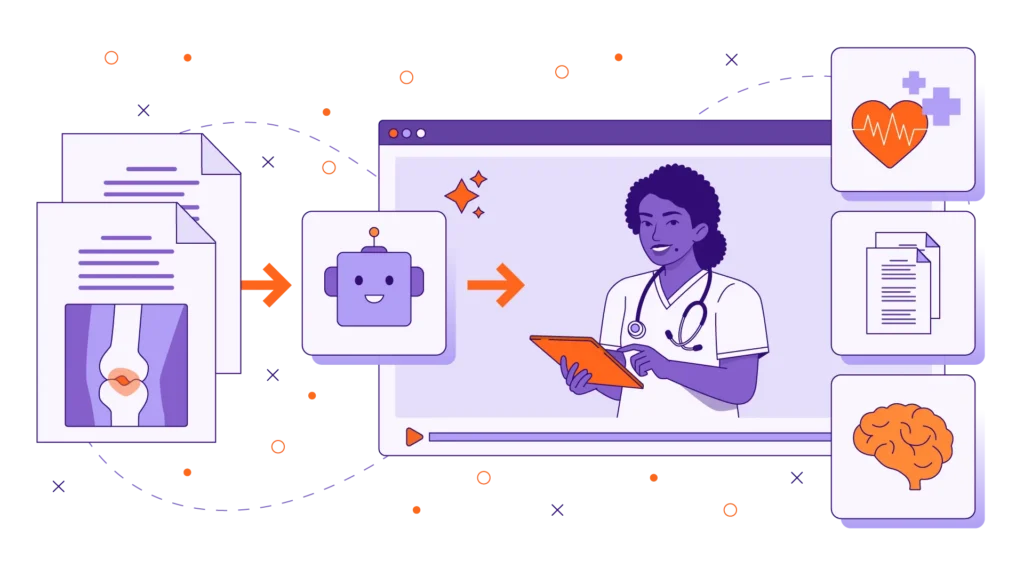
We have packaged our most effective, field-tested frameworks into a clean, lightweight Markdown (.md) file. Because it is a raw text file, you can easily upload it directly into your preferred AI tool’s “Knowledge Base” or simply copy and paste the guidelines into your chat window to instantly turn the AI into your specialized LX assistant.
Here is what the AI companion empowers you to generate in seconds:
1. Clinical Deconstruction Outlines
Paste a dense clinical protocol into the AI alongside our “Source Mining” framework. The AI will instantly deconstruct the medical text into a structured microlearning outline, isolating the core “need-to-know” takeaways and eliminating unnecessary medical jargon.
2. Empathetic Video Scripts
Writing dual-column video scripts takes hours. Our companion file includes templates specifically designed for patient education video scripting. The AI will generate a complete 60- to 90-second script, including warm voiceover audio, suggested B-roll visuals (like a patient resting comfortably), and on-screen text instructions designed to reduce anxiety.
3. Health Literacy & Plain Language Checks
Already have a script? Use the “QA Editor” prompt within the companion. The AI will act as a health literacy expert, scanning your drafted content to flag complex medical terminology and suggesting plain-language alternatives that are easier for patients to digest.
How to Use the Markdown (.md) File
Using the companion file is incredibly straightforward:
- Download the File: Click the link below to download the .md file.
- Open in Any Text Editor: You can open it in Notepad, TextEdit, or any standard code editor.
- Copy and Paste: Find the prompt or framework that matches your current task (e.g., Prompt 3.1: Post-Op Care Video Script), fill in your specific medical topic in the bracketed placeholders, and paste it into ChatGPT, Claude, or Copilot.
You can download the free resource right here
The Golden Rule: AI is an Assistant, Not a Doctor
While this AI companion will save you dozens of hours in outlining and scripting, it is crucial to remember the golden rule of healthcare instructional design: AI does not have a medical degree.
These tools are designed to get you to a high-quality “first draft” incredibly fast. However, every piece of generated content must undergo a rigorous “human-in-the-loop” review. Your clinical Subject Matter Experts (SMEs), doctors, or charge nurses must review the final scripts to ensure 100% medical accuracy and patient safety before any video is produced. Discover how we balance rapid development with strict regulatory compliance in our association case studies.
Ready to Scale Your Patient Education?
By utilizing a structured, purpose-built AI companion, you can stop fighting with a blank page and spend more time refining the visual empathy of your learning experiences. Download the file, test it on your next project, and watch your production bottlenecks disappear.
If you have your scripts ready and need a specialized partner to turn them into stunning, cinematic patient education videos or interactive modules, we are here to execute your vision. Check out our custom eLearning solutions or reach out via our Contact Page to get started.

Frequently Asked Questions (FAQs)
What is a Markdown (.md) file?
A Markdown (.md) file is a lightweight, plain-text formatting syntax. It is widely used by developers and content creators because it strips away messy background formatting (like the hidden code in a Word document), making it the cleanest and most efficient way to copy, paste, and feed text into an AI Large Language Model.
Why should patient education use microlearning?
When patients are sick, in pain, or receiving a new diagnosis, they often experience severe cognitive overload, making it difficult to remember long instructions. Microlearning breaks down complex care plans into bite-sized, 2- to 3-minute lessons focusing on a single objective, which drastically improves comprehension and discharge compliance.
Can I use this AI companion with any generative AI tool?
Yes. The prompts and frameworks within the file are tool-agnostic. They rely on universal instructional design principles (Role, Context, Instruction, Constraints) and will yield excellent results whether you paste them into OpenAI’s ChatGPT, Anthropic’s Claude, or Google Gemini.